Records & archive management software
that holds its structure

Archival work needs structured records, consistent metadata, controlled access and a change history you can check, all holding up as the collection grows.

  • A case for each series, collection or project
  • Tags applied the same way across the archive
  • A change history that can’t be edited or deleted
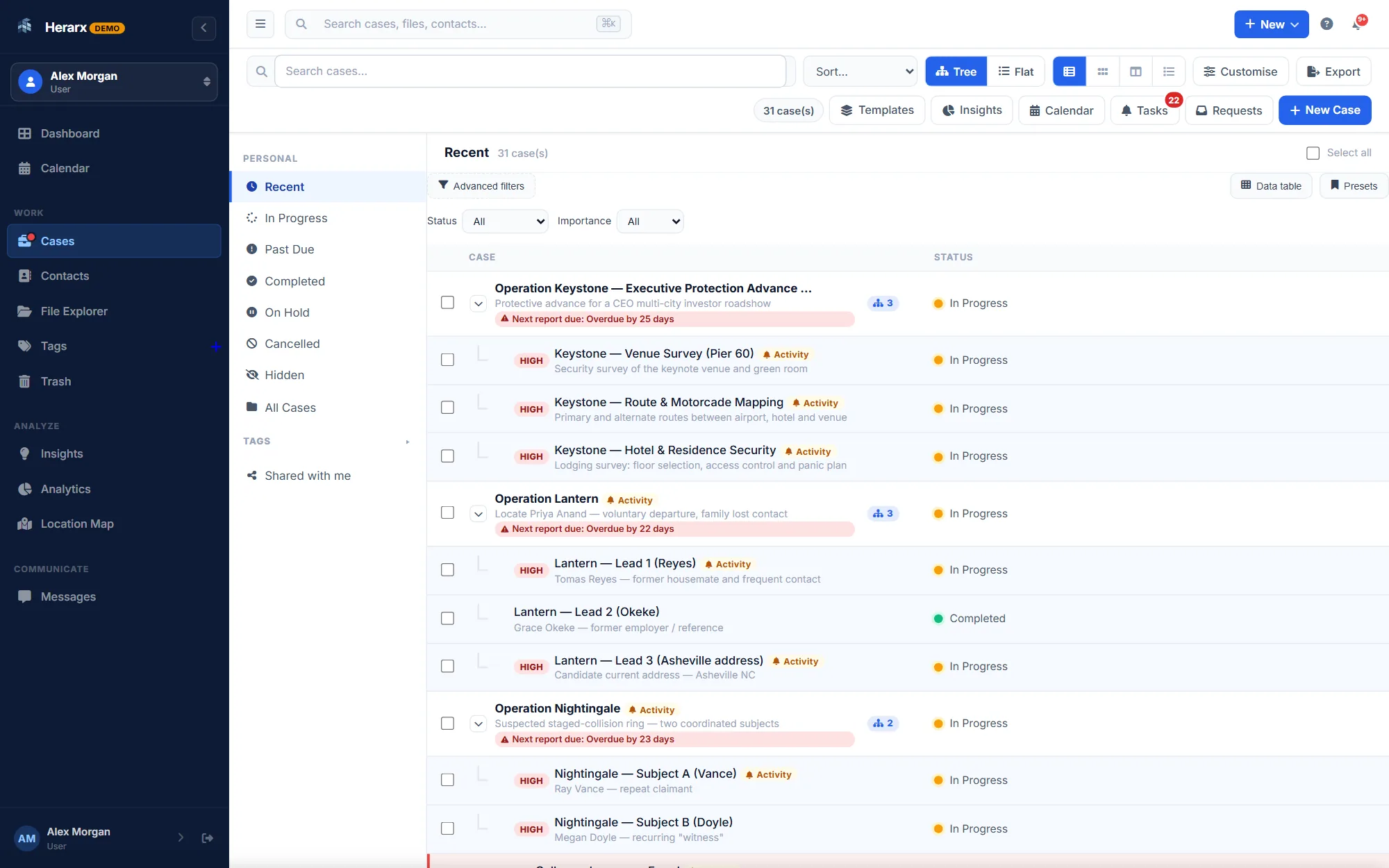
The Herarx cases list with parent cases and the cases nested under them

Parent cases with the cases under them

Template tabs: Provenance · Description · Access & retention · Storage · Reading room

What a record series holds, tab by tab

Start from a template, then rename a tab, add a field or remove one. Everything below comes with the template.

Archives and records template

Archival series

A record series or accession: provenance, description, access and retention, and storage.

  • Overview
  • Provenance
  • Description
  • Access & retention
  • Storage
  • Reading room
Reference code
PH/3/2
Level of description
Series
Date range
1923–1958
Extent
12 boxes · 3.2 linear m
Access status
Restricted
Retention class
Review
Next review
2027-02-01 Warns 30 days ahead
Digitised (%)
40

Digitisation in progress.

An archival collection in Herarx

  • A case is a record groupEach archival series, collection, or project becomes a case — with subject, description, status, and metadata in one structured record.
  • Tag with controlled vocabularyApply tags consistently across cases. Filter the full collection by any tag. Analytics show your tag distribution across the archive.
  • Attach source documentsUpload originals and working copies to the case. Every file is encrypted at rest and access-logged — the provenance stays intact.
  • Control who sees whatGrant access to specific cases with defined roles. Restricted records stay restricted — even as your team grows.
  • Immutable change historyEvery action — view, edit, upload, permission change — is logged with timestamp and user. The audit trail cannot be edited or deleted.

Reviews that warn you

The next retention review warns you 30 days ahead and adds a task. An overdue review raises the importance.

Rules on the record

Restricted or closed material needs a restriction reason. A series marked for destruction asks you to confirm the authority first.

Reading room

Each request with the researcher, items produced, hours and whether it was supervised, with totals for the series.

Collections roll up

A collection (fonds) parent case rolls up its series by access status, extent and review date.

Also in the template library: Collection (fonds) · Digitisation batch · Information request (FOI and subject access) How templates work →

Shared drives don't scale into a real archive

Folder trees drift, metadata is inconsistent, and no one can prove what changed. Here's the difference.

Shared drives & folders

  • Inconsistent naming and metadata across the collection
  • No record of who accessed or altered a file
  • Access control is all-or-nothing at the folder level
  • Search means remembering where something was filed
  • Provenance erodes every time files are moved or copied

With Herarx

  • Structured metadata on every record group, applied consistently
  • Immutable audit trail of every view, edit, and change
  • Per-record role-based access for restricted material
  • Full-text search across records, notes, tags, and contacts
  • Provenance preserved — the record holds its history

The structure archival work actually demands

Not a generic document store. A workspace designed around structured records, controlled vocabulary, and long-term accountability.

Immutable audit trail

Every access, modification, and permission change is logged automatically with a timestamp and user attribution. The trail cannot be edited or deleted — ever. Provenance is preserved.

Tag-based classification

Build a controlled vocabulary as tags and apply them consistently across cases. Filter your full collection by any combination of tags. Analytics surface your tag distribution at a glance.

Full-text search

Search across case names, descriptions, notes, contacts, and tags in a single query. Find any record in the collection without knowing exactly where it was filed.

Role-based access control

Grant read, edit, or admin access per case, per user. Restricted series stay restricted regardless of who joins the organisation. Access changes are logged instantly.

Encryption at rest & in transit

All files are encrypted at rest and stored on infrastructure separate from the database and web server. TLS-encrypted transport. Your records are protected at every layer.

Structured case metadata

Each record group has a title, description, status, importance level, associated contacts, and a location. Consistent metadata across every record in the collection — not freeform notes.

Collection analytics

Cases opened and closed over time, status and importance breakdowns, and most-used tags — charted automatically. Understand the shape of your collection without running manual reports.

Controlled external access

Share specific files or an entire case with a researcher or external reviewer via a secure, time-limited portal link — without granting them a system account or access beyond what you choose.

Hardware key & 2FA support

Protect access with TOTP two-factor authentication or WebAuthn hardware security keys. Every account is behind a second factor — no exceptions, no configuration required.

From acquisition to long-term access

A consistent four-step structure that keeps every record group organised, documented, and findable indefinitely.

  1. Create the record group

    Open a case for the series or collection. Set the title, description, date scope, and importance. Apply your controlled-vocabulary tags from the start.

  2. Attach materials & contacts

    Upload source documents and working copies directly to the case. Add creators, donors, and custodians as contacts with provenance notes attached.

  3. Set access & restrictions

    Configure which team members can view or edit each record group. Restricted material gets restricted access — enforced automatically, not by convention.

  4. Provide access with accountability

    Share via secure portal link for external researchers. Every access is logged. The audit trail shows who viewed what and when — permanently.

Share with clients, only what you choose

Clients and other people outside your team see the documents you pick. They never see your workspace or your other cases.

On Premium and Max

Client portal

Share chosen documents through a secure link that expires. No account needed. Clients can upload what you ask for, and every view is recorded on the case.

How the portal works ↗

On the Max plan

E-signature

Send a document on the case for signature. The client confirms a code sent to their email and signs from their phone. The signed copy comes back to the case.

  1. 10:52Sent the document for signature
  2. 11:04The client confirmed the emailed code
  3. 11:06Signed on a phone
  4. 11:06Signed copy saved to the case
How e-signature works ↗

Anyone can check a signed document

Upload the PDF, or type the code printed next to its QR code, to see that the signature is intact and the file unchanged. No account needed, and the file isn't kept.

Verify a document

Security on every plan

Including Free. Nobody sees a case until you add them to it.

Two-factor sign-in

Authenticator apps and hardware keys.

People on each case

Only the people you add can open a case; their role sets what they can do.

The full record

Every view, edit, share and sign-in, logged.

Encryption

In transit and at rest, files apart from the database.

Session timeouts

An unattended session signs itself out.

Hashed passwords

Passwords are stored as bcrypt hashes, never as plain text.

Independent security audit: planned, not yet done.

Your cases stay private and secure

Nothing on a case is visible to anyone you haven't added. Files are encrypted at rest and kept apart from the database.

How we protect data →

See Herarx in a minute

Two short films showing what every case has, from opening it to sending a document to sign.

Walkthrough · 58 sec

One place for every case

Open a case, keep its records and payments, see cases on a map, and send documents for signature.

In this film

Start free

Questions records managers ask

Something else? Write to us

What software is good for digital records management?

Good records management software gives you structured metadata, consistent classification, controlled access, full-text search, and a verifiable change history. Herarx provides all of these: each record group is a structured case, tags act as a controlled vocabulary, access is role-based per record, and the audit trail is immutable.

Does Herarx support long-term retention and an audit trail?

Yes. Records stay in their structured cases for as long as you need them, and every action — view, edit, upload, permission change — is recorded with a timestamp and user. The audit trail cannot be edited or deleted, which is what makes long-term retention defensible.

Can I control access to restricted records?

Yes. Access is granted per record group, per user, with read, edit, or admin roles. Restricted series remain restricted regardless of who joins your organisation, and any change to access is logged immediately in the audit trail.

How does Herarx handle metadata and classification?

Each record group carries structured metadata — title, description, status, importance, contacts, and location — plus tags you apply as a controlled vocabulary. You can filter and search the whole collection by any tag, and analytics show your tag distribution so classification stays consistent.

Is Herarx free to start?

Yes — there's a free tier, so you can structure a first collection before deciding. Encryption, role-based access, 2FA, and the immutable audit trail are included on every plan, including free.

From the blog

More articles

Also using Herarx

See every use →

Also on Herarx: Researchers & Consultants

Give your collection the structure it deserves.

Always free to get started. Encryption and audit logging are on from day one — not a paid add-on.