Case management for lawyers.
Every matter, on the record.

For law firms and in-house legal and compliance teams. Documents, parties, deadlines and discussion for each matter in one place, with a record of who saw what and when.

  • Deadlines from every matter on one calendar
  • A record of who opened each document
  • Clients sign documents from their phone

Template tabs: Matter · Parties & docs · Time & billing · Client account

What a matter holds, tab by tab

Start from a template made for legal work, then rename a tab, add a field or remove one. Everything below comes with the template.

Law firm template

Legal matter

Run a matter from open to close: key dates and limitation, hearings, time recording and disbursements.

  • Overview
  • Matter
  • Parties & docs
  • Time & billing
  • Client account
Matter no.
M-2026-0042
Practice area
Litigation
Client is
Claimant
Limitation date
2027-03-14 Warns 60 days ahead
Next hearing
2026-12-02 Warns 7 days ahead
Engagement letter signed
Yes
Hours recorded
18.5
Work in progress
4,625.00
Balance due
1,250.00

The client has an outstanding balance.

In-house and compliance template

Compliance matter

Internal investigations and compliance matters: parties, allegations, documents, risk and outcome.

  • Overview
  • Parties
  • Findings
  • Documents
  • Risk & outcome

AllegationStatus

Supplier payments outside policyOpen

Expense claims misusedSubstantiated

Client data sent outside the firmUnsubstantiated

  • Document register with a privileged flag on each entry
  • Respondent, complainant, counsel and regulator as contacts
  • Response deadline warns 14 days ahead

Dates that warn you

The limitation date warns you 60 days out and turns red at 14. Hearings warn you a week ahead. Both add a task and sit on your calendar.

Warnings on the matter

A banner tells you when there is no signed engagement letter, a hearing is within 7 days, or the client owes money.

Time and money

Record time by fee earner and rate, add disbursements, and keep bills and payments against a running balance.

Documents from the matter

A fee note, a statement of account and a client letter, filled in from the matter's own fields.

Also in the template library: New client intake (conflict check, ID and AML) · Conveyancing · Estate administration and probate · Immigration application · Contract review · Trademark and IP filing · Debt recovery How templates work →

From intake to resolution

A structured four-step process that keeps every matter organised, accountable, and defensible from open to close.

  1. Open the matter

    Create a case, set the classification and importance, assign access only to the team members who need it — with exactly the role they need.

  2. Build the record

    Upload documents, link involved parties as contacts, log findings as dated notes. Every action is attributed and timestamped automatically.

  3. Track tasks & decisions

    Create tasks for follow-up actions with due dates and priority. Log key decisions as case records so the reasoning behind them is always traceable.

  4. Close with a full trail

    Outcome recorded, audit trail complete, matter closed. If it ever needs to be reopened — or handed to external counsel — the entire record is ready to share.

Who saw what, and when, on the record

When a regulator, a tribunal or a client asks who knew what and when, an email thread can't answer. Herarx records every view, edit, upload, comment and change of access on the matter, with the person and the time.

  • Written automatically as you work
  • The record can't be edited or deleted
  • Export it when a matter closes or escalates
What gets recorded →

RecordM-2026-0042

  1. 09:12You opened the matter from the Legal matter template
  2. 09:20You added J. Okafor as Editor
  3. 10:04J. Okafor uploaded Witness statement.pdf
  4. 11:05P. Lyle viewed Draft settlement.pdf · portal
  5. 14:30J. Okafor added a dated note: call with the other side
  6. 15:22You changed J. Okafor to Read only
  7. 16:40You exported the record

Deadlines across every matter

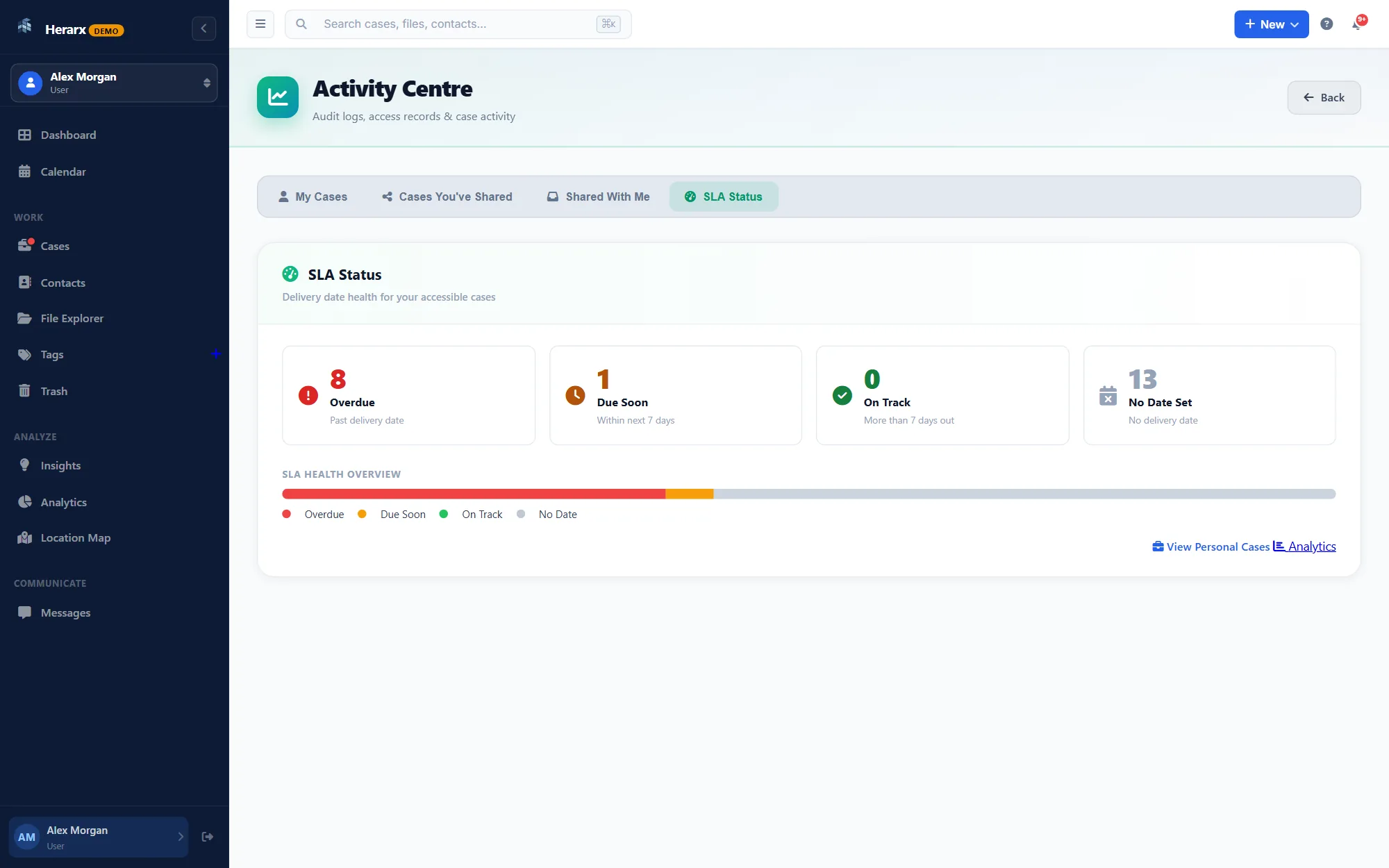
Tasks with due dates, priority and an assignee. Overdue and due-soon items from all your matters in one list.

See the activity centre ↗ The Herarx activity centre listing overdue and due-soon tasks across cases

Roles on each matter

Read, edit or admin, per person and per matter. A sensitive matter is visible only to the people you invite.

  • YouAdmin
  • J. OkaforRead only
  • A. ChenEditor
  • P. Lyle, clientPortal · 3 documents

Every change of access goes on the record.

Dated notes

Findings, decisions and call notes in date order, each with its author.

Threaded comments

The team's discussion stays on the matter, with replies, edit history and names.

Parties and contacts

Employees, counsel, regulators and witnesses linked to the matter, with private notes on each.

Share with clients, only what you choose

Clients, outside counsel and regulators see the documents you pick. They never see your workspace or your other matters.

On Premium and Max

Client portal

Share chosen documents through a secure link that expires. No account needed. Clients can upload what you ask for, and every view is recorded on the case.

How the portal works ↗

On the Max plan

E-signature

Send a document on the matter for signature. The client confirms a code sent to their email and signs from their phone. The signed copy comes back to the matter.

  1. 10:52Sent Engagement letter.pdf to P. Lyle
  2. 11:04P. Lyle confirmed the emailed code
  3. 11:06Signed on a phone
  4. 11:06Signed copy saved to the matter
How e-signature works ↗

Anyone can check a signed document

Upload the PDF, or type the code printed next to its QR code, to see that the signature is intact and the file unchanged. No account needed, and the file isn't kept.

Verify a document

Security on every plan

Including Free. Nobody sees a case until you add them to it.

Two-factor sign-in

Authenticator apps and hardware keys.

People on each case

Only the people you add can open a case; their role sets what they can do.

The full record

Every view, edit, share and sign-in, logged.

Encryption

In transit and at rest, files apart from the database.

Session timeouts

An unattended session signs itself out.

Hashed passwords

Passwords are stored as bcrypt hashes, never as plain text.

Independent security audit: planned, not yet done.

Your cases stay private and secure

Nothing on a case is visible to anyone you haven't added. Files are encrypted at rest and kept apart from the database.

How we protect data →

Watch a matter, open to signed

Two short films. One follows a legal matter; the other shows what every case has.

For lawyers · 58 sec

Running a legal matter

Open a matter, keep the client’s documents together, and let the client sign from their phone.

In this film

Start free

Questions legal & compliance teams ask

Something else? Write to us

What's the best software for managing internal investigations?

Internal investigation software needs to keep all matter documents, communications, and findings in one place, with an immutable audit trail and per-person access controls. Herarx does this: every case holds all documents, contacts, notes, and tasks in one record, with role-based access per case and a tamper-evident log of every action from open to close.

Does Herarx provide an audit trail suitable for compliance purposes?

Yes. Every file access, edit, comment, permission change, and case update is recorded automatically with a timestamp and the user who performed it. The audit trail cannot be edited or deleted. Herarx has not yet completed a formal independent security audit (it's on the roadmap), so for environments with specific regulatory certification requirements, verify this fits your compliance framework.

Can I control who sees sensitive matters?

Yes. Access is granted per case, per user, with read, edit, or admin roles. A sensitive matter is only visible to the team members you invite. Access changes are logged immediately. You can also share specific documents with external parties via a secure, expiring portal link without exposing anything else.

Can multiple team members collaborate on the same matter?

Yes. You can invite any number of team members to a case with specific roles. Internal comments, tasks, and notes are all attributed and timestamped, so the full collaboration history is preserved — not scattered across email.

Is Herarx free for legal teams?

There's a free tier that lets you run your first matters before committing. Paid plans add team features for larger operations. Encryption, 2FA, and the full audit trail are included on every plan, including free.

From the blog

More articles

Also using Herarx

See every use →

Also on Herarx: Archivists & Records Managers Researchers & Consultants

Every matter deserves a proper record.

Always free to get started. Audit logging and encryption are on from day one.